Bluetooth Low Energy is often associated with mobile apps, embedded firmware, or cloud gateways. In practice, however, BLE is equally powerful on the desktop. With the right tools, a desktop application can scan, decode, and visualize BLE sensor data in real time—without relying on browsers or mobile platforms.
In this tutorial, we demonstrate how BleuIO can be used as a flexible BLE interface for desktop applications written in Rust, using the Dioxus framework. The result is a native desktop application that scans nearby HibouAir sensors, decodes their BLE advertisement data, and presents air-quality metrics in a clean, responsive user interface.
This project is intended as a practical example that shows how BleuIO fits naturally into modern desktop development workflows—regardless of programming language.
What We Are Building
The application is a native desktop air-quality dashboard. It connects to a BleuIO USB dongle over a serial port, puts the dongle into BLE scanning mode, and continuously listens for BLE advertisements from nearby HibouAir sensors. These advertisements contain manufacturer-specific data with environmental measurements such as CO2 concentration, particulate matter, temperature, humidity, pressure, VOC levels, and ambient light.
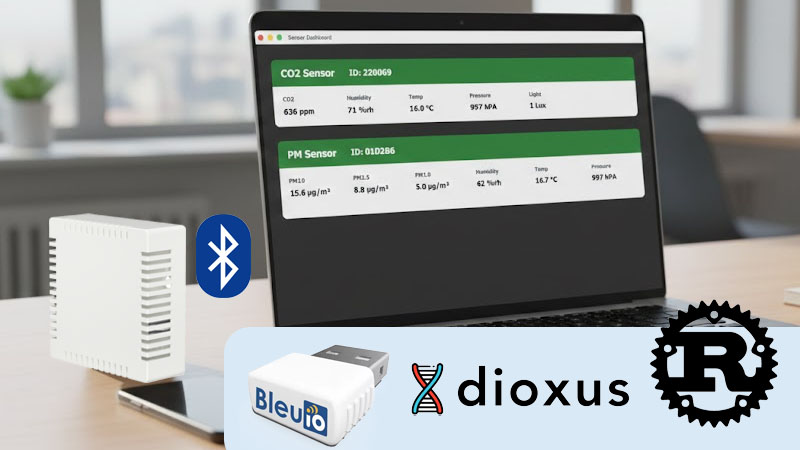
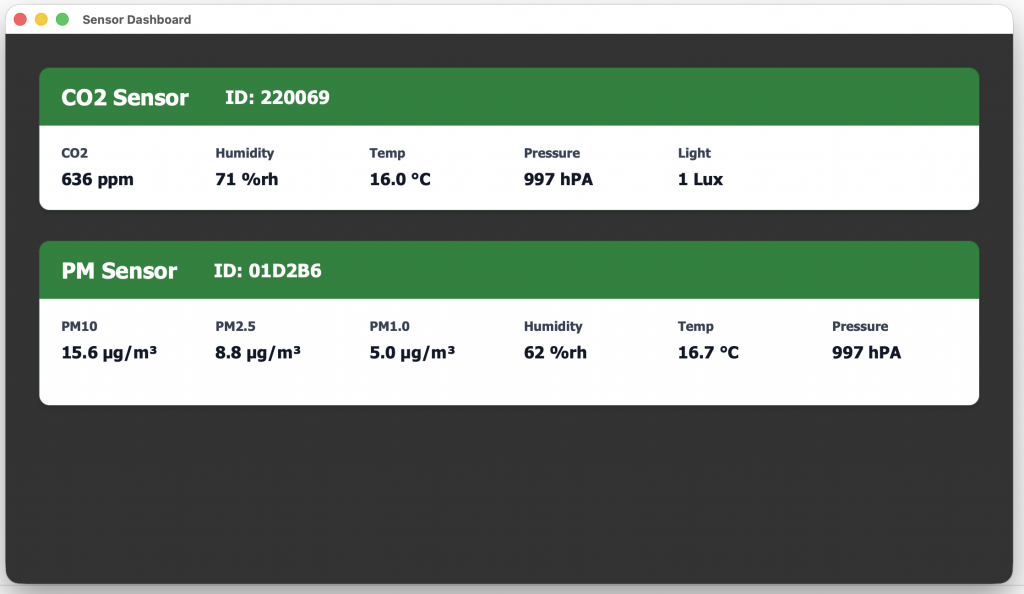
The desktop application decodes this data locally and displays it in real time. Each detected sensor is shown as its own panel, with a clear header identifying the device type and a structured content area showing the latest measurements.
The entire solution runs locally on the user’s computer. There is no cloud dependency, no browser runtime, and no mobile device involved.
Why Rust and Dioxus?
Rust has become increasingly popular for system-level and desktop applications because it combines performance, memory safety, and strong tooling. For BLE applications that involve continuous serial communication and real-time data processing, these properties are particularly valuable.
Dioxus is a Rust UI framework inspired by modern component-based design. It allows developers to build native desktop interfaces using a declarative approach while still compiling to a true desktop binary. In this project, Dioxus is used to render the dashboard, manage state updates as sensor data arrives, and keep the UI responsive even during continuous BLE scanning.
The combination of Rust, Dioxus, and BleuIO demonstrates that desktop BLE applications do not need to rely on platform-specific SDKs or heavyweight frameworks.
Requirements
To run this project, the following hardware and software are required:
Hardware
Software
- Rust toolchain (stable)
https://www.rust-lang.org/tools/install - Dioxus CLI
https://dioxuslabs.com/learn/0.5/getting_started - A supported desktop operating system (macOS, Linux, or Windows)
No proprietary SDKs or BLE drivers are required. BleuIO communicates using standard AT commands over a serial interface, making the setup lightweight and portable.
How the Project Works Internally
When the application starts, it first searches for a connected BleuIO dongle by scanning available serial ports and matching the dongle’s USB vendor and product IDs. Once the correct device is found, the application opens the serial port and initializes the dongle by disabling command echo and enabling verbose mode.
After initialization, the application instructs BleuIO to start scanning for BLE advertisements that match HibouAir’s manufacturer identifier. BleuIO then streams scan results back to the application as JSON-formatted lines over the serial connection.
Each incoming scan packet is parsed and inspected. The application locates the BLE manufacturer-specific data, verifies that it belongs to HibouAir, and decodes the payload into a structured Rust data type. To ensure stable and predictable readings, only the full advertisement format used by HibouAir beacon type 0x05 is processed. Partial or auxiliary beacon formats are ignored in this example project.
Decoded sensor data is stored in memory and immediately reflected in the user interface. As new advertisements arrive, the corresponding sensor panel updates automatically.
Project Structure
The source code is organized into clear, functional modules. UI components are separated from BLE logic and data models, making the project easy to understand and extend. The main application entry point configures the desktop window and mounts the dashboard component. BLE communication is encapsulated in a dedicated hook that runs asynchronously and feeds decoded sensor data into the UI layer.
src/
├── components/
│   ├── dashboard.rs
│   ├── sensor_panel.rs
│   └── mod.rs
├── hooks/
│   ├── use_bleuio.rs
│   └── mod.rs
├── models/
│   ├── bleuio.rs
│   ├── hibouair.rs
│   ├── sensor_data.rs
│   └── mod.rs
├── main.rs
assets/
├── main.css
├── tailwind.css
└── favicon.ico
This structure mirrors how larger Rust desktop applications are typically organized, and it provides a solid foundation for adding features such as data logging, historical charts, filtering, or export functionality.
Source Code and How to Run the Project
The complete source code for this project is publicly available on GitHub:
GitHub repository:
https://github.com/smart-sensor-devices-ab/hibouair-bleuio-rust-readltime-desktop
After cloning the repository, the application can be run in development mode using the Dioxus CLI. This launches the desktop window and enables hot reloading, which is useful when experimenting with UI changes or decoding logic. The project can also be built and run using standard Cargo commands, producing a native desktop binary.
Because the code is open and self-contained, developers are free to study it, modify it, or reuse parts of it in their own BLE-based desktop applications.
The complete instruction on how to run this project is available on the Readme file.
Application Output
When running, the application displays a dashboard with one panel per detected HibouAir sensor. Each panel includes a colored header identifying the sensor type, followed by a white content area showing live air-quality measurements. Values update continuously as new BLE advertisements are received, providing an immediate view of the surrounding environment.
A screenshot of the running application is shown below to illustrate the final result.
This project is intentionally kept simple. It is not a finished product, but rather an educational example that demonstrates how BleuIO can be used with Rust and Dioxus to build a native desktop BLE application. The source code is public, easy to follow, and designed to be extended.