Build a Cloud Air Quality Dashboard with HibouAir, BleuIO, and TagoIO
August 21, 2026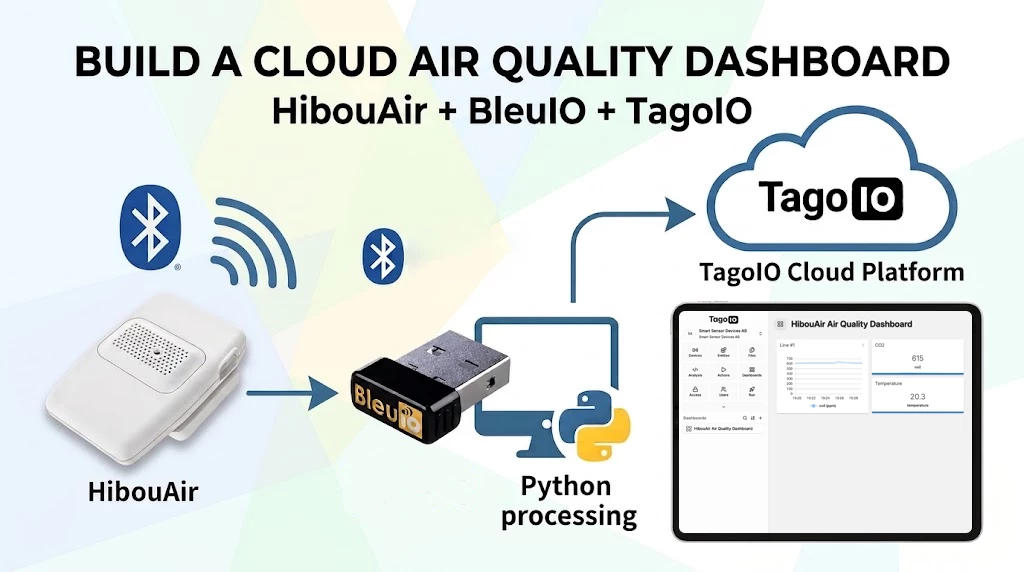
Air quality and environmental monitoring are common IoT use cases where Bluetooth Low Energy sensors can provide useful real-time information without requiring complex infrastructure.
In this project, we will use HibouAir as our air quality monitoring sensor, BleuIO as the Bluetooth Low Energy interface, and a Python application to collect and decode the advertised sensor data. The decoded measurements will then be sent to TagoIO, where we can store and visualize the data using an online dashboard.
The goal is to keep the project simple. There is no need to install an IoT server, MQTT broker, database, or dashboard software locally. BleuIO handles the BLE communication, the Python application processes the sensor data collected from HibouAir, and TagoIO handles the cloud side.
Why TagoIO?
TagoIO is an IoT platform that provides tools for connecting devices, storing sensor data, and creating dashboards for visualization.
For this project, one of the main reasons for choosing TagoIO is that it is easy to get started. It provides a free plan, which is suitable for experimenting with a small number of devices and building proof-of-concept IoT applications.
This makes it particularly useful for projects such as environmental monitoring where we simply want to send sensor measurements to the cloud and visualize them without setting up our own backend infrastructure.
If the project grows later, TagoIO also provides paid subscription options with additional resources and capabilities. This means we can start with the free option while developing and testing the project, and move to a larger plan later if necessary.
Another useful feature is its dashboard builder. Once our sensor variables reach TagoIO, we can create cards, displays, gauges, and time-series charts directly from the web interface.
For our HibouAir project, this allows us to visualize measurements such as:
- Temperature
- Relative humidity
- CO2
Project Requirements
For this project, we need the following hardware and software.
Hardware
BleuIO
BleuIO is a USB Bluetooth Low Energy dongle that allows us to control BLE communication using simple AT commands over a serial connection.
In this project, BleuIO scans for the BLE advertisements transmitted by HibouAir and passes the received advertisement data to our Python application.
HibouAir
HibouAir is the environmental BLE sensor used in this example.
For this project, we are using a HibouAir device advertising with the board ID:
220069
Software Requirements
Install Python 3 if it is not already available.
The project uses the following Python packages:
pyserial
requests
Install them using:
python3 -m pip install pyserial requests
You will also need a free TagoIO account.
Create an account and then create a new device in the TagoIO console.
For example:
Device Name: HibouAir Air Quality Sensor
After creating the device, TagoIO generates a Device Token.
The Device Token is used by the Python application to authenticate when sending measurements to TagoIO.
Keep this token private and do not publish it in a public GitHub repository.
How the Project Works
The project consists of three main stages.
1. Collect BLE Advertisements from HibouAir
HibouAir continuously broadcasts environmental data using Bluetooth Low Energy advertisements.
BleuIO is connected to the computer through USB and appears as a serial device.
On macOS, for example, the BleuIO dongle may appear as:
/dev/cu.usbmodemxxxxxxx
The Python application opens this serial port and communicates with BleuIO.
To locate our specific HibouAir device, the application asks BleuIO to search for advertisements containing the HibouAir board ID:
220069
Conceptually, the command looks like:
AT+FINDSCANDATA=220069=3
BleuIO scans for matching BLE advertisements and returns the advertisement data to the Python application.
The data received from BleuIO contains the raw BLE advertisement in hexadecimal format.
The Python application identifies the HibouAir environmental advertisement and extracts the relevant bytes from the payload.
The values are then decoded into useful environmental measurements.
For example:
Temperature : 24.6 °C
Humidity    : 48.2 %
CO2         : 612 ppm
Sending the Data to TagoIO
Once the HibouAir advertisement has been decoded, the Python application prepares the measurements in the format expected by TagoIO.
For example:
[
  {
    "variable": "temperature",
    "value": 24.6,
    "unit": "°C"
  },
  {
    "variable": "humidity",
    "value": 48.2,
    "unit": "%"
  },
  {
    "variable": "co2",
    "value": 612,
    "unit": "ppm"
  }
]
The application then sends the data to the TagoIO API using HTTPS.
The TagoIO Device Token is included with the request so that TagoIO knows which device the measurements belong to.
After the first successful upload, the variables automatically become available for the device in TagoIO.
In this example, the variables are:
temperature
humidity
co2
The application continues scanning for new HibouAir advertisements and periodically uploads new measurements.
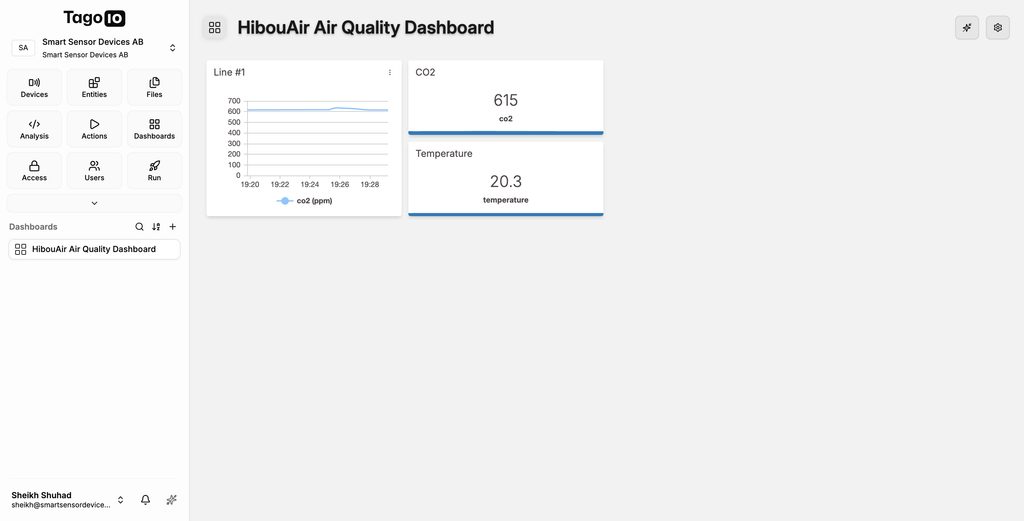
Creating the TagoIO Dashboard
Once the sensor data starts appearing in TagoIO, we can create a dashboard.
In the TagoIO console, go to:
Dashboards
Create a new dashboard and give it a name such as:
HibouAir Air Quality Dashboard
We can then add widgets using the variables sent by our Python application.
For example, we can create current-value widgets for:
Temperature
Humidity
CO2
We can also add line charts to display how each measurement changes over time.
Because TagoIO stores timestamps with the measurements, the line-chart widgets can display the sensor data as a time series.
This gives us a simple cloud-based air-quality monitoring dashboard without having to maintain our own database or web application.
Source Code
The complete source code for this project is available on GitHub:
GitHub:
https://github.com/smart-sensor-devices-ab/BleuIO-hibouair-tagoio
Configure the Application
Before running the application, update the configuration with your BleuIO serial port and TagoIO Device Token.
For example:
BLEUIO_PORT = "/dev/cu.usbmodem4048FDE52CF21"

HIBOUAIR_ID = "220069"
You will also need your TagoIO Device Token.
For development, the token can be supplied through the application configuration.
The TagoIO API endpoint also needs to match the region used by your TagoIO account.
Running the Application
Make sure:
- BleuIO is connected to the computer.
- HibouAir is powered on and advertising.
- Your computer has an Internet connection.
- Your TagoIO Device Token has been configured.
Then run:
python3 script.py
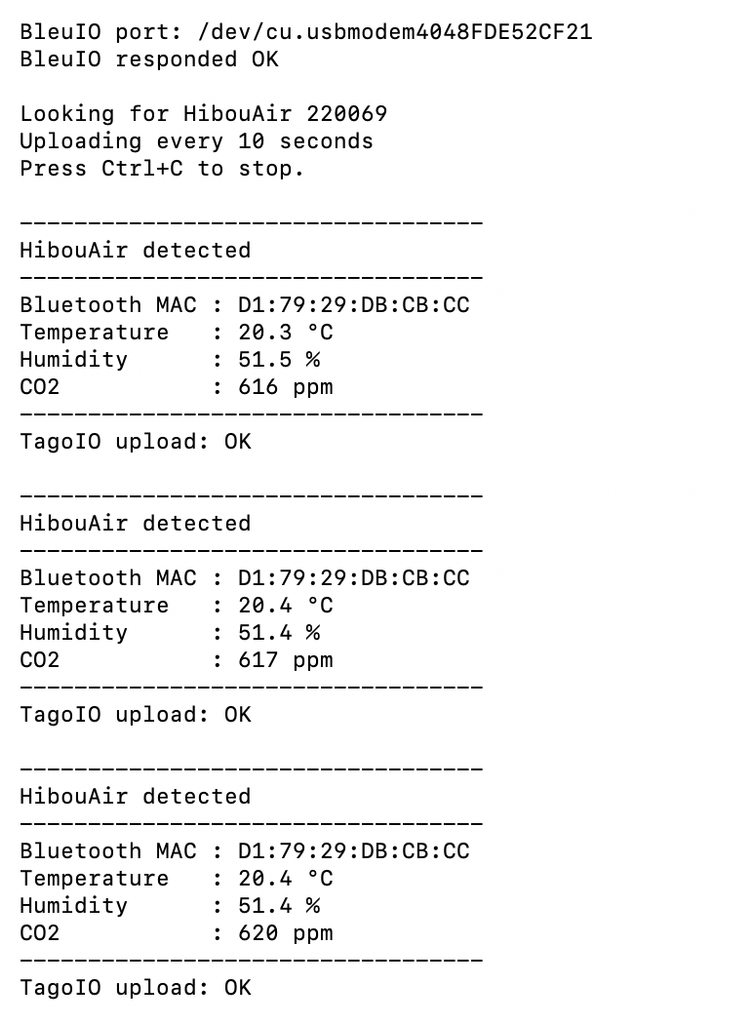
The application should first connect to BleuIO.
You should see output similar to:
BleuIO + HibouAir + TagoIO
==========================

BleuIO port: /dev/cu.usbmodem4048FDE52CF21
BleuIO responded OK

Looking for HibouAir 220069
When a valid HibouAir advertisement is received, the decoded sensor measurements will be displayed:
----------------------------------
HibouAir detected
----------------------------------

Temperature   : 24.6 °C
Humidity      : 48.2 %
CO2           : 612 ppm

----------------------------------

TagoIO upload: OK
The application will continue scanning and uploading new readings until it is stopped.
Use:
Ctrl + C
to stop the application.
Output
After the application has been running for a while, the sensor measurements will be available from the TagoIO device page and dashboard.
The dashboard can display the latest HibouAir measurements as well as their historical changes.
In this project, we created a simple cloud-connected environmental monitoring system using HibouAir, BleuIO, Python, and TagoIO.
This project should be considered a starting point rather than a finished monitoring product.
The code can be modified or expanded in many ways. Feel free to modify, extend, or reuse the code in your own BLE and IoT applications as needed.