Running a HibouAir BLE Air Quality Scanner on Adafruit Fruit Jam with BleuIO
September 18, 2026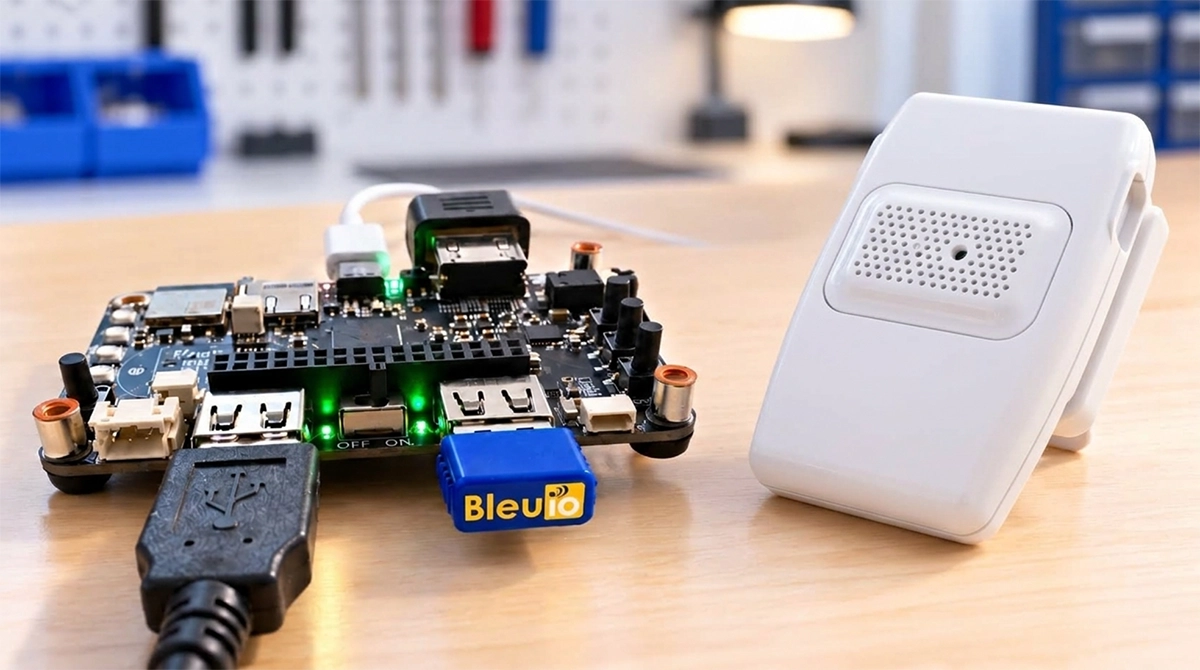
In this project, we will look at how the BleuIO SSD025 Bluetooth Low Energy USB dongle can add BLE communication to an Adafruit Fruit Jam powered by the RP2350.
The project takes an unusual software approach. Instead of running the HibouAir scanner as part of the native firmware, the Fruit Jam runs a custom real-time operating system called myRTOS .
A myRTOS application module, hibouair.c, written in C, communicates with the BleuIO dongle over USB, scans for nearby HibouAir air-quality sensors, decodes their Bluetooth Low Energy advertisements and displays the latest measurements in real time in a terminal window.
The result is a compact embedded BLE air-quality gateway running on the RP2350.
Requirements
For this project, we use:
- Adafruit Fruit Jam with RP2350B
- BleuIO SSD025 Bluetooth Low Energy USB dongle
- One or more HibouAir SSD002 air-quality sensors
- myRTOS
- USB data cable
- Computer with a serial terminal such as PuTTY
The Fruit Jam is particularly suitable for this project because it has a built-in USB hub with two exposed USB host ports.
What does this project do?
1. HibouAir broadcasts sensor data
2. BleuIO receives the BLE advertisements
3. Fruit Jam receives the data over USB
4. myRTOS decodes and displays the measurements
The HibouAir sensor periodically broadcasts its measurements using BLE advertising packets. The SSD025 receives these packets and makes the information available to the RP2350 over USB.
The myRTOS application then scans for HibouAir devices, interprets the received information and maintains a live list of detected sensors.
The terminal provides an easy way to observe the air-quality information as it arrives.
Hardware
The project is built around three main pieces of hardware.
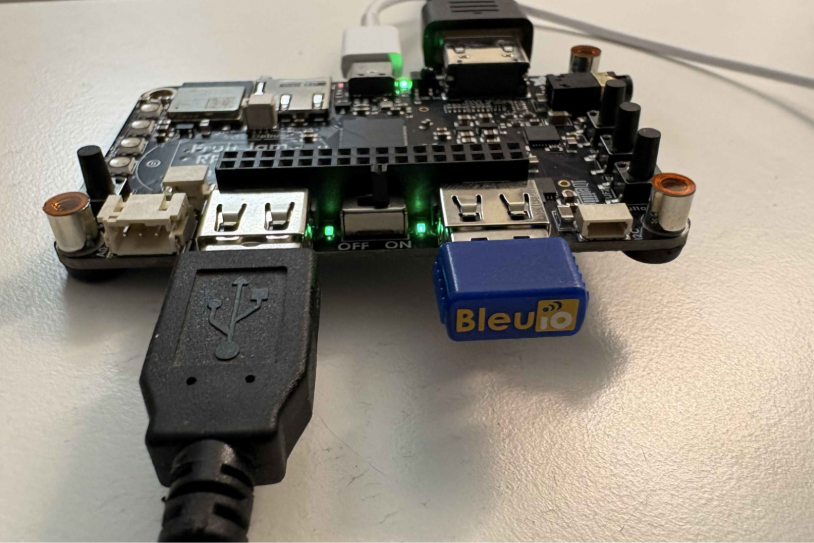
Adafruit Fruit Jam with the BleuIO SSD025 connected directly to the USB Type-A host port.
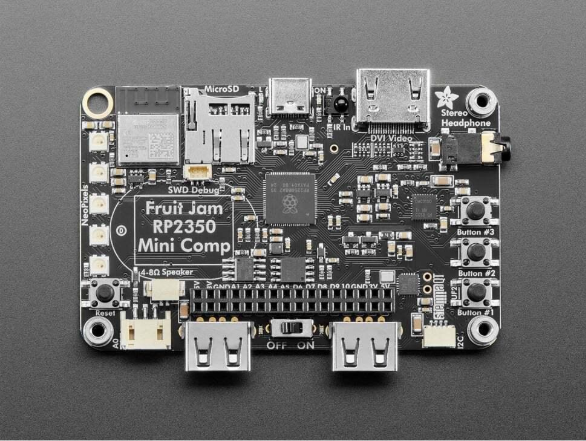
Adafruit Fruit Jam
The Fruit Jam is a compact computer based on the RP2350B microcontroller. Adafruit provides two USB Type-A host ports through an onboard USB hub, making it possible to connect USB peripherals directly to the board.
The board provides considerably more functionality than is required for this simple gateway. In addition to the RP2350B, it includes flash storage, PSRAM, USB host capability, microSD, DVI output, audio hardware and an ESP32-C6 for wireless connectivity.
For this project, however, the important feature is the USB host interface .
BleuIO SSD025
The BleuIO SSD025 is used as the Bluetooth Low Energy interface.
This means the RP2350 application does not need to implement the Bluetooth Low Energy stack itself.
The dongle supports Bluetooth 5.2 and USB Full Speed, can operate in Bluetooth central or peripheral roles, and is controlled through its USB interface.
The application can therefore access BLE functionality through BleuIO’s USB interface while leaving the Bluetooth communication to the dongle.
HibouAir SSD002
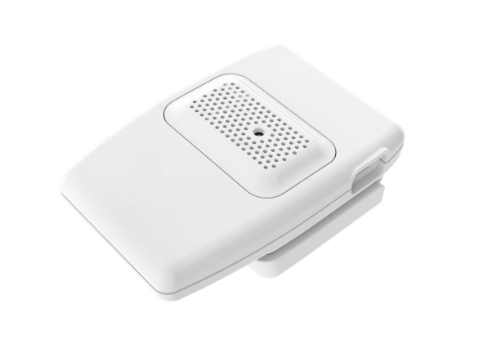
The HibouAir SSD002 is the wireless air-quality sensor.
HibouAir’s documentation describes the SSD002/2B as a CO2 air-quality monitor using an NDIR CO2 sensor, with wireless Bluetooth connectivity. The sensor family can provide environmental parameters including CO2, temperature, humidity, particulate matter and VOC-related measurements depending on the model.
Why use BleuIO?
The BleuIO acts as the bridge between the USB host implemented by the Fruit Jam and the Bluetooth Low Energy devices in the surrounding environment.
The application processor can concentrate on:
- USB communication
- RTOS scheduling
- data parsing
- terminal output
while the BleuIO handles the Bluetooth side.
BleuIO’s own HibouAir gateway example similarly uses BleuIO to provide BLE communication to RP2040/RP2350 development boards through USB.
The Software Architecture
The software in this project is based on myRTOS , a small real-time operating system environment running on the Fruit Jam.
The HibouAir application is started from the RTOS command interface:
myrtos:/> hibouairOnce started, the application enters scanning mode:
scanning; ctrl-C to stop
The application then continuously processes incoming BLE data.
Conceptually, the software pipeline looks like this:
HibouAir → BLE advertisements → BleuIO SSD025 → USB → Fruit Jam / myRTOS → HibouAir packet decoding → Terminal display
The important point is that this is not simply a raw BLE packet monitor.
The application turns the incoming wireless data into a human-readable sensor table .
How to Run the Project
The complete project is available on GitHub:
https://github.com/smart-sensor-devices-ab/Adafruit-Fruit-Jam-with-BleuIO
- Connect the board: Connect the Adafruit Fruit Jam to your computer using a USB-C cable and turn the power switch ON.
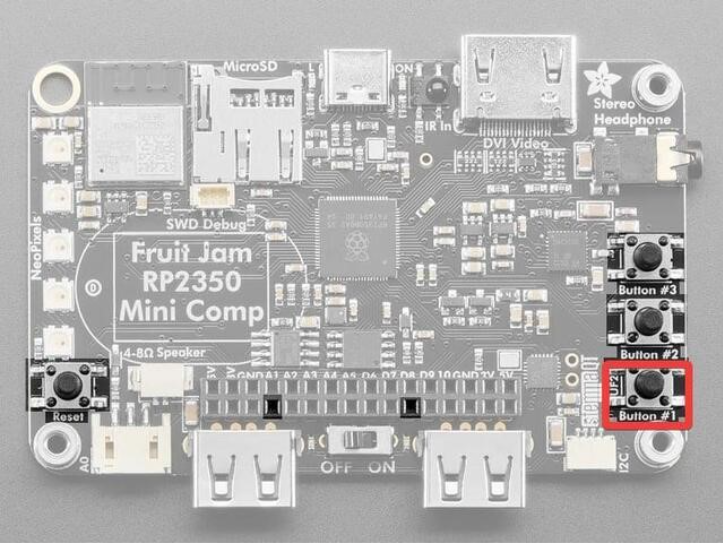
- Hold down Button #1 (the UF2 BOOT button located on GPIO0), press and release the reset button while continuing to hold Button #1, and release Button #1 only after the bootloader drive appears.
- Drag the project’s .uf2 file onto the board’s bootloader drive. The image includes myRTOS and the hibouair.c application module.
- Press the reset button to reboot the board.
- Connect the BleuIO SSD025: Plug the BleuIO SSD025 into one of the Fruit Jam’s USB Type-A host ports.
- Power the HibouAir sensor: Make sure one or more HibouAir sensors are powered on and within Bluetooth range of the BleuIO dongle.
Button Locations on the Adafruit Fruit Jam
To enter UF2 bootloader mode, this project uses two buttons on the Fruit Jam:
- Button #1 (UF2 BOOT) — located on GPIO0 towards the bottom-right edge of the board.
- Reset button — located on the left edge of the board.
The image below shows the location of both buttons.
After rebooting, open a terminal window and connect to the board.
Windows
After rebooting, open Device Manager and identify the COM port assigned to the Fruit Jam. Connect to this port using a serial terminal such as PuTTY.
macOS
To find the Fruit Jam’s serial port, open a terminal and run:
ls /dev/cu.usbmodem*The command should return a device similar to:
/dev/cu.usbmodem2351xxxxConnect to it using:
screen /dev/cu.usbmodem2351xxxx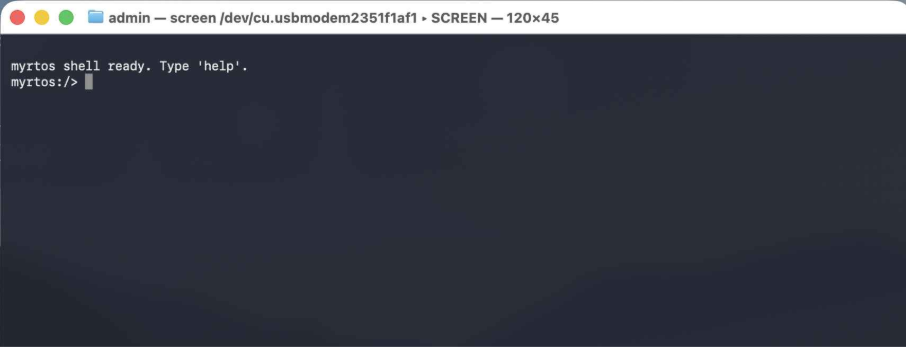
Real-Time HibouAir Scanning
After connecting to the Fruit Jam, start the HibouAir application from the myRTOS command interface:
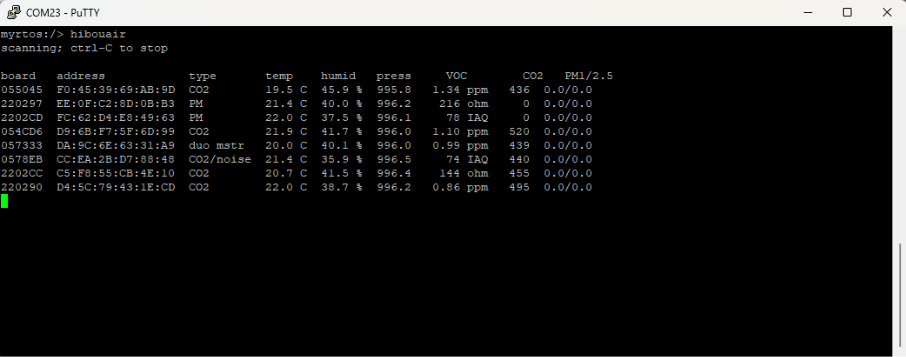
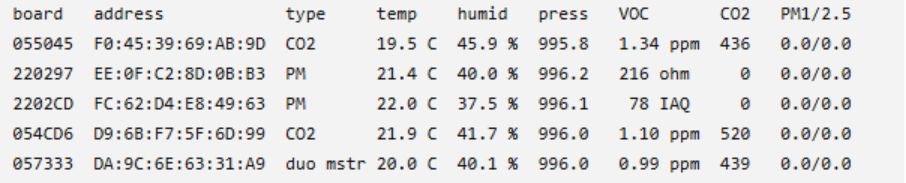
myrtos:/> hibouairscanning; ctrl-C to stopThe program then prints a table containing the detected HibouAir devices.
This gives the user an immediate overview of all the HibouAir sensors currently being received.
Expected Output
For example, the output below shows several HibouAir devices detected during a scan. The table shows each detected device’s board identifier, Bluetooth address, sensor type and latest environmental measurements.
Where Could This Go Next?
The current application concentrates on the essential task: receiving HibouAir advertisements and presenting the decoded measurements in real time.
Logging the data to the Fruit Jam’s microSD card would also make it possible to create long-term air-quality datasets without requiring a permanently connected computer.
The Fruit Jam’s USB host capability, microSD storage and RP2350B processor make this type of expansion practical.
Conclusion
This project demonstrates how the Adafruit Fruit Jam, BleuIO SSD025 and HibouAir SSD002 can be combined to create a compact RP2350-based Bluetooth Low Energy air-quality gateway.
HibouAir sensors broadcast their environmental measurements over BLE. BleuIO receives these advertisements and transfers the data to the Fruit Jam over USB, where the myRTOS hibouair application decodes the sensor data and presents the latest measurements in real time.
The project shows how BleuIO can add BLE communication to an RP2350-based embedded system while keeping the Bluetooth interface separate from the main application.